How to use custom dimensions to monitor pages across multiple language versions
If you have multiple language versions of your website the page URLs will usually group together based on the URL parameters, like this:

But sometimes you might want to view how a page performs overall, not just the specific language versions of that page. To do so, you can use custom dimensions to track pages across multiple languages.
A custom dimension is data about your visitors that you want to assign your visitors. There are two types of custom dimensions: visit dimensions and action dimensions. To track pages we're going to use the action dimension. If you want to learn more in-depth about what custom dimensions are and how you can utilize them, you can read our article "How to create custom dimensions".
Let's create our action dimension
The settings are found in the sidebar menu under Analytics. Select "Action dimensions".

Select "Add action dimension" and give it a descriptive name. This will later be the name of the graph.

Next, we're going to add an extraction. The extraction will, just as it sounds, extract the parts of the URL. To know what's to be extracted we'll use Regex. Depending on the structure of your URL:s, the Regex will look slightly different.
Select "Page URL".
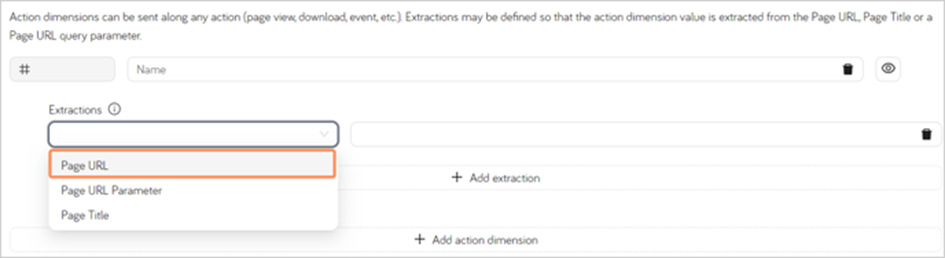
Note the first extraction that matches will be used.
If your URL looks like this: www.domain.com/en/page it will follow this structure:
/en/(.*)You don't need to escape the forward slashes, as Extellio does this automatically.
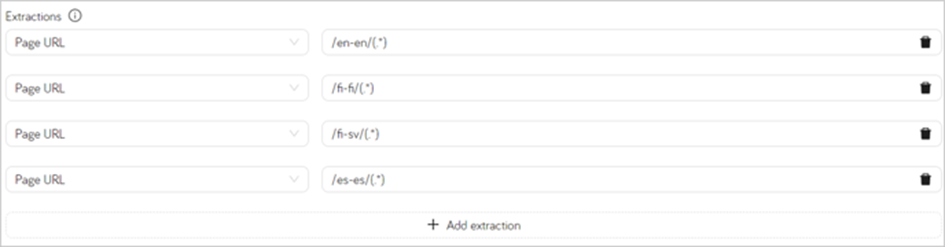
You will need to create one extraction for each language version.

If your URL looks like this: www.domain.com/en-en/page it will follow this structure:
/en-en/(.*) You don't need to escape the forward slashes, as Extellio does this automatically.
You will need to create one extraction for each language version.
Viewing the data
You will find the chart under "Behavior" in the sidebar menu, under the name you gave the custom dimension. For example, "Pages across languages".