Turn user actions into insights with events
Updated: Jun 23
Let's start with what an event is
In simple terms, an event is just something a user does that can be measured. It could be clicking a button, opening a menu or using a product filter - any action you care about tracking. Instead of only knowing that someone visited a page, events help you understand what they actually did while they were there. That extra layer of detail makes it much easier to see how people are using your website and where things are working (or not).
What events should you track?
Track actions that move your KPIs, not everything that moves. We recommend you start with your business goals, then work backwards. If your goal is growth, focus on events that show acquisition quality and early engagement, like which campaigns bring in users who actually interact, not just bounce on the landing page.
If one of your goals is information accessibility, you'll want to track events that show whether your content is actually being seen and used. That could be things like expanding FAQs and accordions, scrolling through important content, or navigating between related content.
If activation is a priority, track the moments that signal someone is getting value, like using a core feature or reaching a meaningful milestone. And if revenue is your focus, track the steps that lead up to conversion, such as pricing page views or feature comparisons.
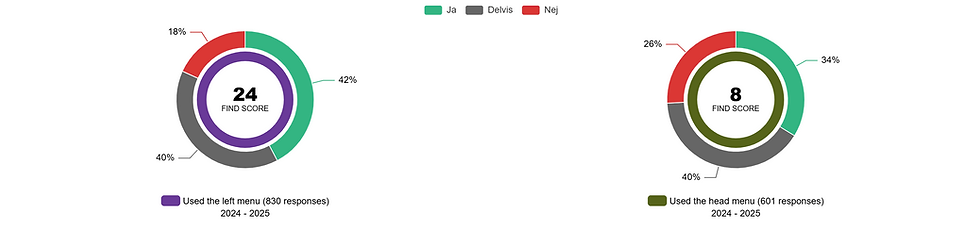
You can segment your survey data based on whether the respondent performed the event or not
Event tracking becomes even more powerful when you use it alongside your survey results. By segmenting responses based on whether a respondent completed a key action, you can connect what people say with what they actually do. For example, you can compare answers from users who used a feature, like applying a filter or used the side menu, with those who didn't. It’s a simple way to add context to your data and uncover insights that would otherwise stay hidden.
You can also segment your heatmaps and session recordings
Events will tell you what happened while session recordings show you how it happened. By using events to segment your recordings, you can quickly find sessions where a specific behavior occurred, like users who clicked a certain button, opened a feature, or dropped off at a key step. Instead of watching recordings at random, you can jump straight to the moments that matter and see the full context behind the action.
At the end of the day, event tracking is about turning activity into understanding. It helps you focus on the actions that actually matter to your goals, adds context to your survey data, and makes tools like session recordings far more useful. You don’t need to track everything, just the moments that tell you something meaningful. Start small, stay focused on your KPIs, and build from there. Over time, those insights add up to a much clearer picture of your users and better decisions because of it.