How to check for broken links
If you have analytics via Extellio, you can check for broken links on your website. This is especially helpful for websites with many links, but also if you have updated pages or URLs and want to make sure there are no mistakes.
There are two options for broken links: Scan now with a manual scan, and scan automatically every week or every month.
First of all, you find broken links under Data sources/Analytics/Broken links.

Manual scan
If you want a single scan, click on the button "Check page now" in the top right corner.

You will now get a few options:
1) What parts of the website do you want to scan? You can scan either the entire website or just a specific page. The URL determines start page.
2) This setting determines if you scan one page or the entire website. Leave empty to scan only one page, which will be the URL above. If you select "Check internal links", the scan will start on the URL selected and then follow all internal links around the website and check all the pages it passes. The menus are included in the internal links. Some pages, e.g. campaign pages, that are not linked to on the website will be missed in the scan.
3) Exclude resources if not relevant.

Click on "Run check" and you will receive an email once the scan is done.
Automatic scan
If you want to scan the website regularly, you can set up automatic scans. Click on the button "Settings" in the top right corner.

Select how often you want to scan, with the options "Never", "Weekly", and "Monthly". Then select the recipients of the emails.

As for the manual scans, the recipients will receive an email once the scans are done.
Scan results
Once the scan for broken links is done, you can either click on the link in the email or go to broken links in the platform and select the latest scan from the list. You will then see the results from the scan.
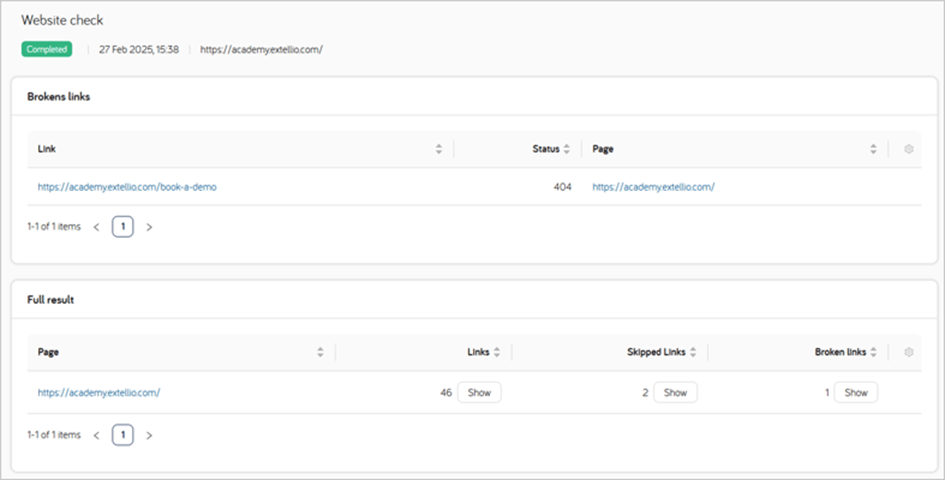
In the example below, you can see when the scan was completed and which URL. You get a list of the broken links, the status and the page. Below you will find the summarized full result.
If you go back to the overview for broken links you now have a list of scans and summaries of how many pages were scanned, how many links, how many of them were broken, and the status of the scan. In the image below, one scan is still running.

Broken links is still a beta version, and we appreciate any feedback you may have. Please note that there are some limitations for older licenses, but broken links is included for all analytics levels available on our website now. If you're restricted by your license but still want to scan for broken links, or have any feedback, email your Extellio person or customersuccess@extellio.com and we'll help you.