How to import search engine keywords from Google to your analytics
Dec 11, 2025
1 min read
Finding out what your visitors searched to get to your website can help you improve your marketing efforts, SEO strategies and usability.
Are you using the same terminology as your users? Are they landing on the appropriate pages for their search terms? What information is interesting to your users? Which keywords are converting, and which aren’t? Which keywords are trending right now? are among the many questions you can answer by connecting your Google Search Console.
First you need to sign into your Google Search console …
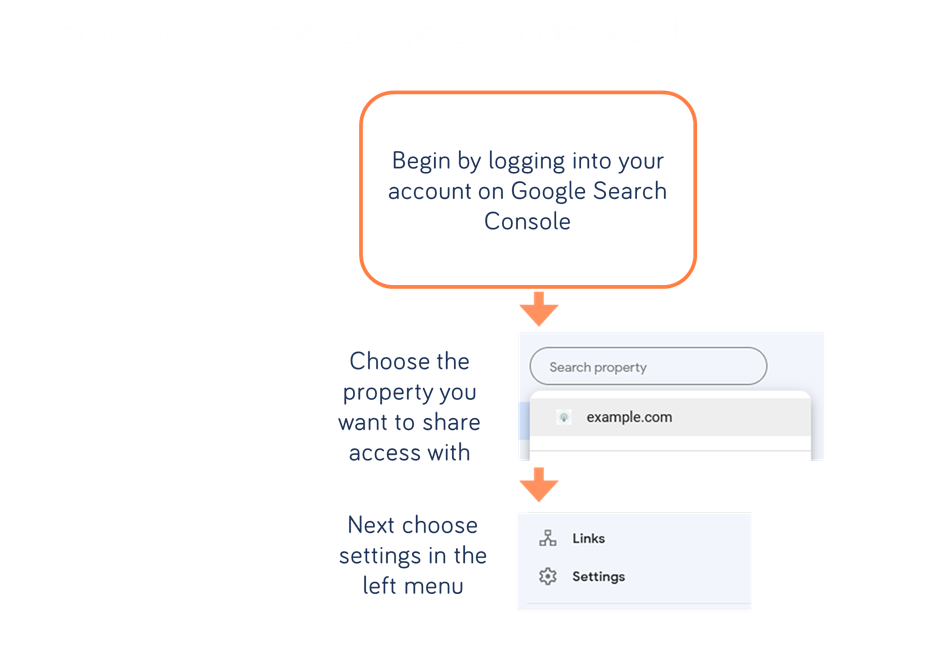
Next, go to users and permissions…

… then you need to add Extellio Please note the updated e-mail adress is: it@e-space.se

Next, you need use this form below to let us know which website you want to connect your Google search console for:
We'll send you an e-mail once your Google search console has been connected to Extellio!
… you can then find your keywords here….

Note that Google delivers the keywords with a two-day delay. That means the completed report for the previous week will be available the following Wednesday.